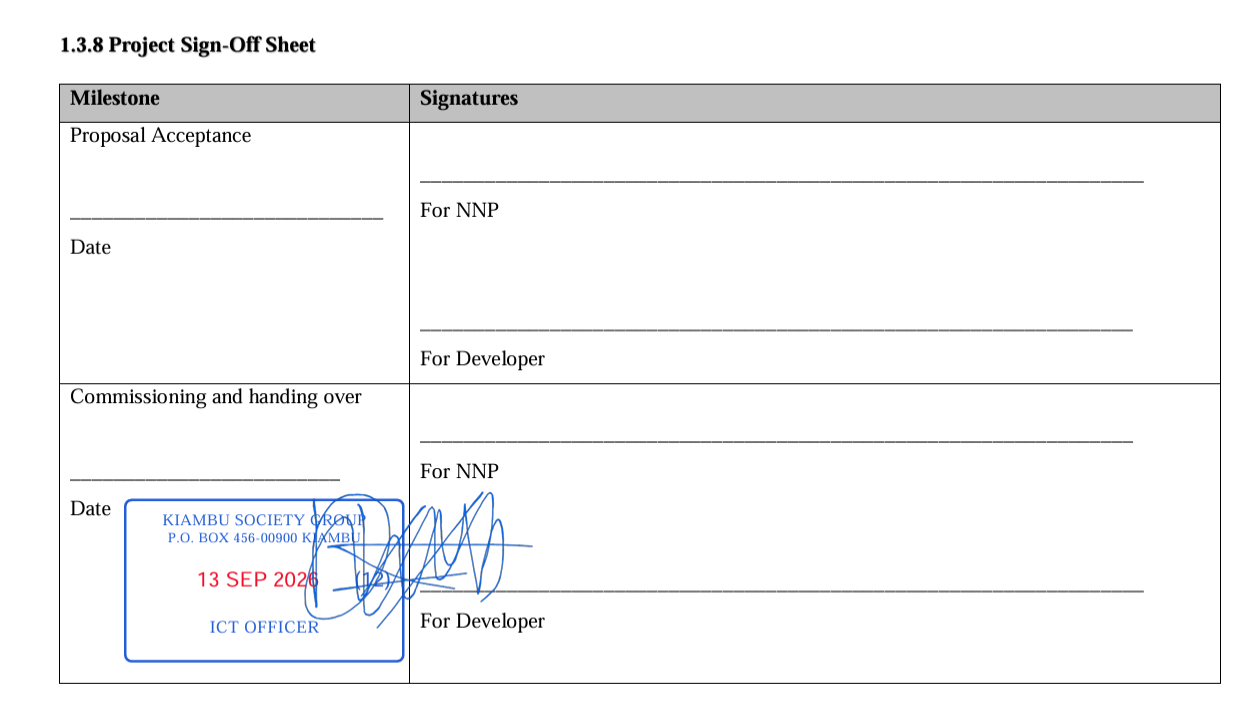
What Is an Electronic Document Management System?
An Electronic Document Management System, commonly called EDMS, is software used to organize electronic documents and manage the processes around those documents.
A modern EDMS goes beyond storage. It can support document capture, classification, routing, approval, digital stamping, electronic signatures, verification, notifications, controlled sharing and audit history.
Why Kenyan Organizations Are Digitizing Documents
Organizations manage increasing volumes of digital records while still depending on paper for many approvals and official processes. This creates duplicate work because staff print documents, sign or stamp them, scan them and then store the scanned copy.
An EDMS can reduce these repeated steps by keeping more of the workflow digital.
EDMS Versus Shared Folders
A shared folder provides a location for files. An EDMS provides a controlled document lifecycle.
With a workflow based system, users can identify document ownership, pending actions, approvals and processing history instead of simply knowing where a file was saved.
Core EDMS Features
- Centralized document storage.
- Document metadata and classification.
- Department and office routing.
- Approval workflows.
- Role based permissions.
- Digital institutional stamps.
- Electronic signatures.
- QR document verification.
- Notifications.
- Audit history.
- Controlled external submissions.
Document Capture and Upload
The document lifecycle begins when a document enters the system. Upload controls should validate supported formats and restrict the ability to submit documents to authorized users or permitted external requesters.
Document Workflow and Routing
Routing defines the next destination of a document. This can involve departments, offices, managers or specialized processing teams.
A clear routing model helps reduce the common problem where a document is physically present somewhere in the organization but nobody knows who is responsible for the next action.
Digital Approval
Approval workflows can represent institutional decision making electronically. Each stage can have an assigned role or user, a status and a defined next action.
Digital Stamping and Electronic Signatures
EDMS platforms can incorporate privileged actions such as institutional stamping and electronic signing. These functions should be restricted according to organizational roles and internal authorization rules.
External Verification
Documents that leave an organization may need to be verified by employers, partners, regulators or other institutions. QR codes and unique verification references can connect the final document to an online verification service.
Audit Trails
An EDMS should provide a history of important workflow actions. This can include upload, assignment, review, approval, stamping, signing, routing and completion.
EDMS for Universities and TVET Institutions
Universities and TVET institutions can use EDMS workflows for academic documents, administration, procurement, finance, human resources, management records and external document requests.
EDMS for Government and Companies
Government organizations and private companies can apply EDMS workflows to internal correspondence, procurement, contracts, reports, finance, human resources and management approvals.
How to Implement an EDMS
- Map document intensive processes.
- Define departments and responsibilities.
- Classify document types.
- Define approval and routing rules.
- Configure access permissions.
- Pilot the system with selected workflows.
- Train users.
- Measure adoption and processing performance.
- Expand the system based on operational results.
SyntaxDocVerify as an Institutional EDMS
SyntaxDocVerify combines institutional document management with digital stamping, electronic signatures, QR verification, routing and notifications.
Explore institutional EDMS capabilities or request a demonstration.
Conclusion
An EDMS should be treated as an operational platform rather than a digital filing cabinet. The strongest implementation connects documents with people, permissions, workflows, approvals and verification.